Secure your FileMaker data
Troi Encryptor Plug-in is a very powerful tool for securing your FileMaker data, exporting or emailing your data without risk and importing safely back into FileMaker. With the plug-in installed you can do all this from within FileMaker:
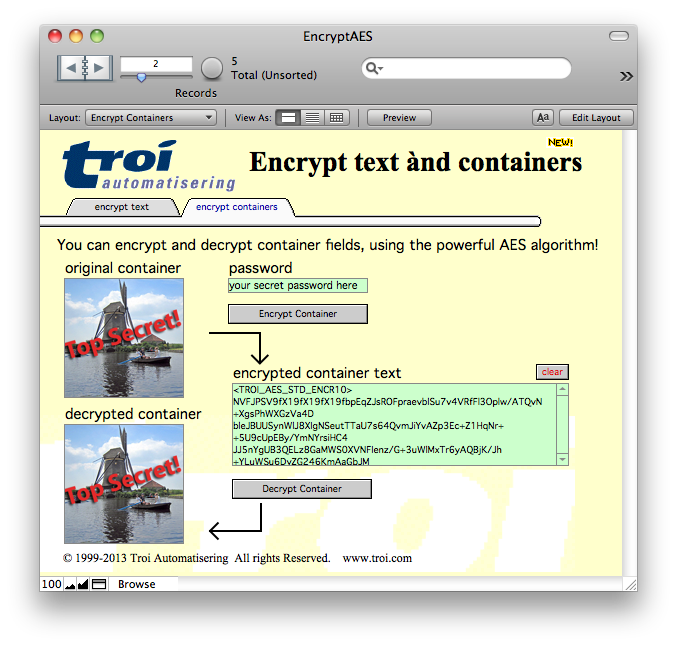
- encrypt text or container fields, using the powerful 256-bit AES encryption scheme, so that your sensitive data is secure
- export encrypted data that can be sent safely over internet, for example via email. No risk that someone will read or change the data while in transit
- use the decryption functions to restore the original information after you have imported the received email or export file back into FileMaker, with the assurance that nobody will have tampered with it
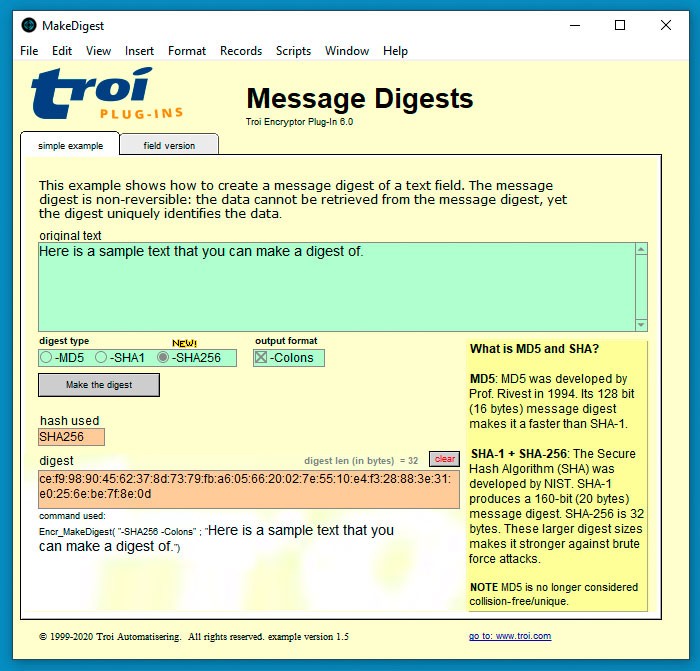
- verify data integrity and sources with SHA-256 message digests
- encode text in e.g. Base64
- make conversions to and from binary
- compress databases with large text fields
AES-256 bit encryption and decryption
With the Encryptor Plug-in you can encrypt fields using the powerful AES encryption scheme, so that your sensitive data is secure. This function will produce text that looks like this:
<TROI_AES_STD_ENCR10>
NVFJPSV9fX19fX19fXzMybiDY8PbHTmYWtbemlDAAibocn0S8Wh1lR9p28t8v3Fn6C1ScIykT
rHrovm+qcmNpkKigVs/NgCn2WjgCDSUQ4iLW+Dmyf6rwR3dTRZPy+s28eQZzBf4NbZFcZEQo
bkTsIQebVM8IQNPjGdSbAe+GNaCY4ai6eeYxC5RzNwKfZGPUtKoKRL/IIS3vTSeVJcefevm9
Fyh3eniVyMXmZCY+G2a+KlJDKBxlvKBPAKo3GsZUsC7A0U2+Xigl2q2dulmZYw1eLbk=
</TROI_AES_STD_ENCR10>
So can you read this? =)
The Encr_EncryptAES function will use AES-256 bit encryption by default. This version stays compatible with older versions though, which used 128-bit encryption: you can still use the 128-bit encryption scheme, by using a switch.
The Encr_DecryptAES function will automatically detect if data previously encrypted with Troi Encryptor Plug-in is AES-128 or AES-256 and decrypt the text automatically. You don’t need to change the scripts or add any switches for this to work.
Exchange encrypted data with other systems
Troi Encryptor Plug-in has 3 functions that enable you to easily exchange AES-encrypted data with other systems. Externally AES-encrypted data can now be decrypted in FileMaker with Troi Encryptor Plug-in and vice versa!
We also added an ‘-OpenSSLCompatible’ switch to the plug-in’s EncryptAES and DecryptAES functions. This facilitates the exchange of encrypted data between the plug-in and the OpenSSL functions of PHP 7 or the openssl command in a command line interface (for example the macOS terminal). In the download we added an extensive example which demonstrates how to decrypt data generated with the plug-in’s EncryptAES function with the OpenSSL functions of PHP 7, and the other way round: how to decrypt data generated by the OpenSSL functions of PHP 7 with the plug-in’s DecryptAES function.
Generate passwords, check password strength and safely store passwords in the keychain
The Encr_GeneratePassword function generates a strong, random password with a specified length. You can check the strength of a password with the Encr_GetPasswordStrength function. The plug-in allows you to store passwords in the keychain and retrieve and delete them later, all directly from FileMaker. When you save a password into the keychain, you specify the name of the account (or user) associated with it, and optionally an extra ID, which will help you distinguish between different passwords for the same account. As the keychain is unlocked when the user logs in to the operating system, the password can later be retrieved from it without the user needing to enter the (keychain) password. You can then use the retrieved password to decrypt text in a field, for example with the Encr_DecryptAES function. A third function allows you to delete previously stored passwords from the keychain.
Compress and decompress text
You can compress text using the ZLIB compression.
Send sensitive data via email
With the SafeAscii function you can create data that can be sent safely over internet, for example via email. It will convert fields that contain higher ASCII, into a format that contains lower ASCII only. For example the text: “•Günther and Børg” will be coded like this:
%Troi SafeAscii v1.0

.VG.Pnther-Pand-PB/>rg

%End SafeAscii v1.0
This can be decoded again, to recreate all the original higher ASCII characters. More importantly, if you use this function on encrypted text it will also be converted to a format that is safe to send over internet.
Export and import data without risk
The plug-in has a function ShortSafeAscii, which is a variant of the SafeAscii function. With this you can export any text field, including encrypted data, to an export file.
And more…
The plug-in has a generic code function, which makes it possible to encrypt a field with the key as the parameter in FileMaker. This opens up the possibility to decrypt without the need for a script.
Suggested Uses
- Make sure that confidential data stays confidential
- Share medical data over internet, including pictures
- Comply with HIPAA guidelines
- Verify the correctness of important text
- Compress large texts
Of course much more is possible. The best way to see if it can help you is to try it out!
Try Troi Encryptor Plug-in before you buy
You are free and invited to test the plug-in before you pay. Troi Encryptor Plug-in is fully functional in demo mode, it will only stop working after 2 hours of testing. Download your copy here.