

Troi File Plug-in is a very powerful tool for getting access to information outside the FileMaker database. Any files stored on the rest of the computer can be accessed through the functions of the plug‑in.

FileMaker Pro 19 to 26 (2026)
FileMaker Server 19 to 26 (2026)
macOS 12 to 26
Windows 10 to 11
Troi File Plug-in lets you deal efficiently with any files or folders outside the database. All from within FileMaker you can:
Troi File Plug-in adds over 90 functions to FileMaker, giving you virtually limitless possibilities! In File Plug-in version 18 you will also find 41 external script steps which perform an action. You can select these in the script steps pane in Script Workspace, or you can begin typing the script step name, then choose it from the list that appears. The script steps significantly expand the possible actions you can perform with FileMaker.
Here we give you just some examples of what you can do with this plug-in:
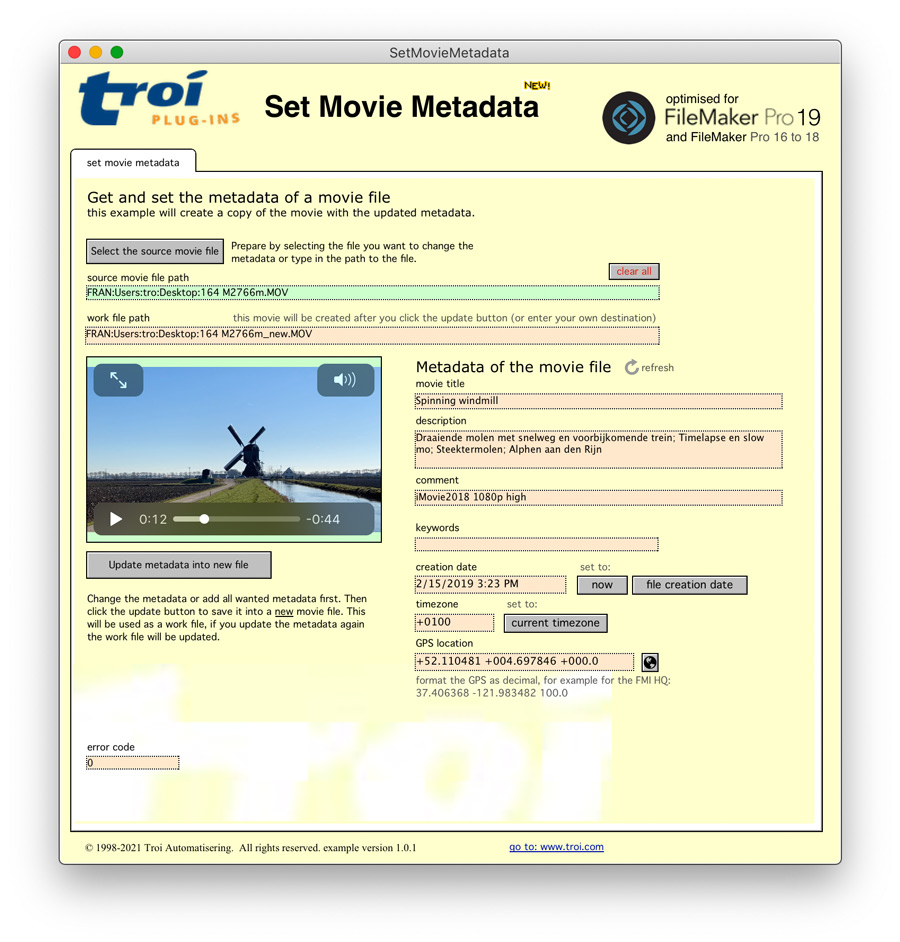
Troi File Plug-in allows you to retrieve extensive image and movie data like width, height and depth, and much more. While we were at it we also added an extensive example file ManageMedia.fmp12. This example file combines some of the Troi File Plug-in’s functions to create a powerful Media Manager for images and movies. It shows how to import one or multiple images and/or movies from a folder. It also retrieves a wealth of metadata like width and height, IPTC metadata (amongst others caption, description, keywords, copyright), GPS, XMP and Exif metadata. Exif metadata is information about the time a photo was taken, aperture, shutter speed and the like. And did we mention the example file also works with movie files?
With Troi File Plug-in you can write EXIF and IPTC metadata information to your image files. By using the “-SetImageURL” switch you can set the Photoshop Image URL metadata (not part of the official IPTC specification). The “-UTF8CharSet” switch can be used together with the “-SetIPTC” and “-SetEXIF” switch. This will write the metadata encoded as UTF-8 text and will set the CodedCharacterSet tag in the written image file (which indicates the encoding) to UTF-8.
On macOS you can also add and change metadata like title, GPS and creation data in movie files (like .mov and .mp4).
With Troi File Plug-in you can create thumbnails of your image files in any size, including square thumbnails, which is great for presenting multiple images to a user in a compact grid. We have added a grid view to the Thumbnail example file, which demonstrates (in a simplified way) how to do this. We also added the possibility to add a name when creating a thumbnail with the TrFile_CreateThumbnail function. The name is normally not visible, but will be used for example when you perform an Export Field Contents action later. Another feature is the possibility to make thumbnails in the PNG format, with an alpha channel. This means that the thumbnail will have the same transparent areas as the original image.
On macOS you can also create a thumbnail of your movie files (like .mov, .mp4 etc.). The plug-in will create a thumbnail of the first frame of the movie.
Creating thumbnails of pdf files is possible on both macOS and Windows. On macOS the switch “-AllowPDFUpscaling” allows you to create larger sized thumbnails (with high quality) from smaller vector based PDFs.
The GetContents function of the plug-in will return the contents of a (text) file into your database. You can specify a starting position and the number of characters to get, to return only a part of the contents.
To get the text content of a pdf file use the TrFile_GetAsPlainText function.
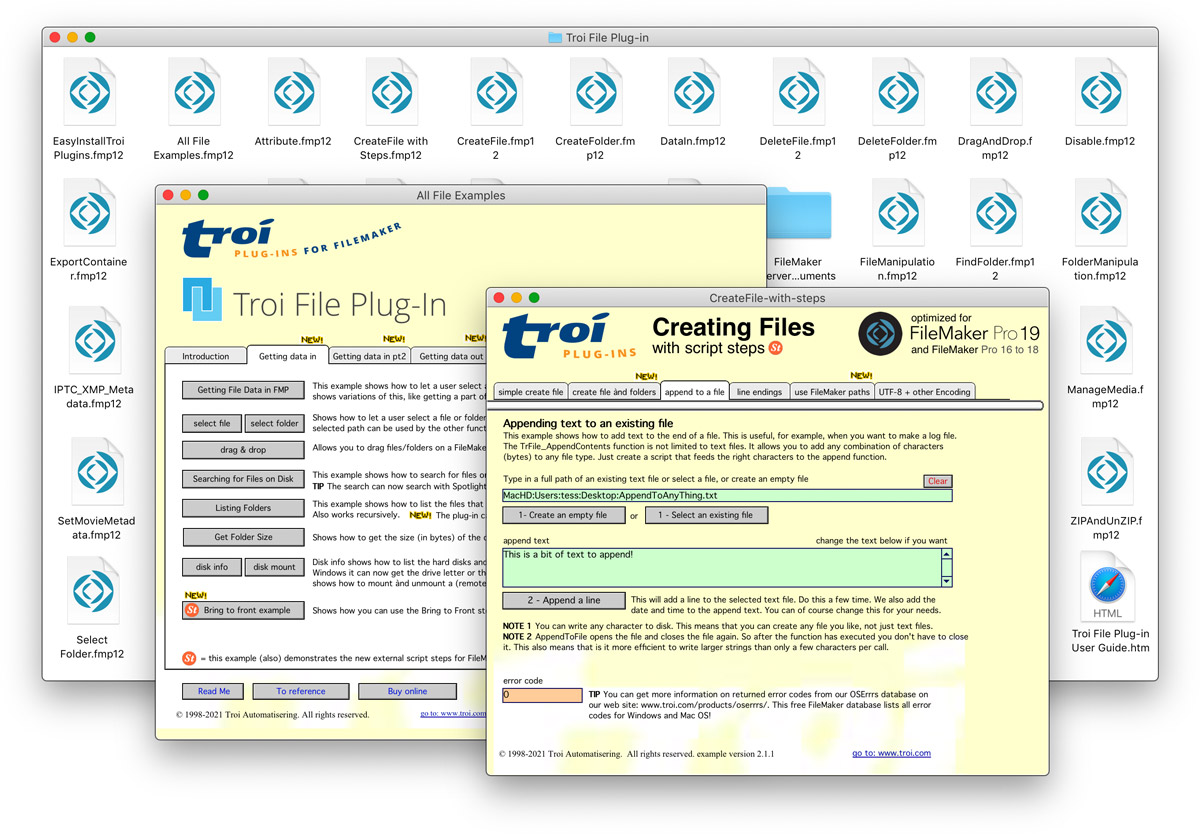
Troi File Plug-in can substitute text in and append text to an external (text) file. You can search for a text string in a file and substitute it with a different text. You can substitute text and have the result saved in the same file! And you can use replace strings of up to 150,000,000 characters, making it possible to substitute tags with much longer replacements in template files. With the function TrFile_InsertContents, you can insert text into a file at a specified position.
Creating a (data) file and setting its (text) contents in one step is also possible. This can be very useful if you don’t have append or update privileges on the file (for example in a drop folder).
Before manipulating files and folders with the many functions Troi File Plug-in offers you, you can check their type and availability, thus avoiding possible errors. The function TrFile_GetTypeOfItem provides an easy way to see if a path points to a folder, file or package folder (macOS). It can also indicate if a file is an alias file (known as shortcut on Windows). To get the extension of a file use the TrFile_GetExtension function. The TrFile_GetFileKind function will return a (localized) description of what kind of file this is. For example a .fmp12 file will return “FileMaker Document” and a .zip file will return “ZIP Archive”. The TrFile_Exists function will tell you if a file or folder you want to manipulate exists and the TrFile_IsFree function will let you know whether a file is in exclusive use by a different application or locked.
The plug-in’s ExchangeFiles function lets you quickly exchange two files that are stored on your disk. Very handy when updating existing files: work in a draft version first and when your draft is ready, replace the original file with just one script step. Also works when the files are located on different disks!
The plug-in’s CreateAlias function lets you create an alias file (or shortcut) from a source file or source folder. Resolving an alias file is easy with the ResolveAlias function. It returns the path to the destination of the alias file. If the alias is broken you can use the switch “-ReturnLastKnownPath” to get the last path the alias pointed to.
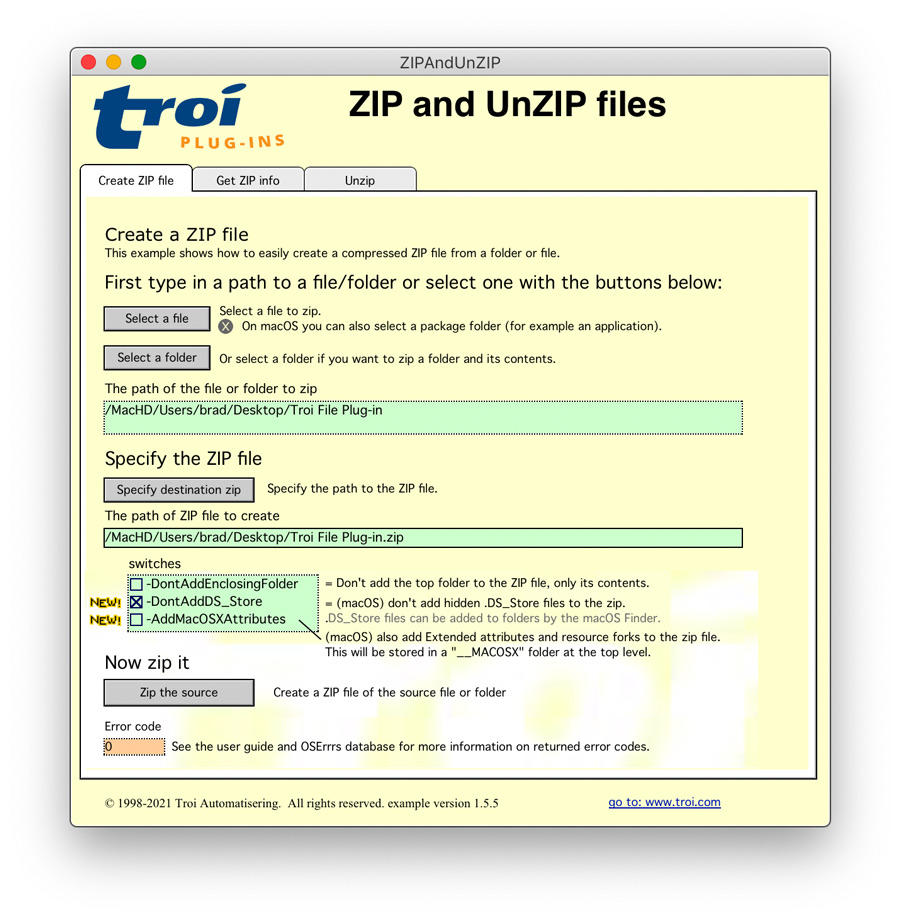
The plug-in’s CreateZip function lets you create a compressed archive of files and folders. Expanding ZIP files is easy with the UnZip function. You can specify the folder where the unzipped items need to be placed. The GetZipInfo function lists the items (files and folders) inside a ZIP file. This allows you to check what’s inside a ZIP file before you unzip it, so no unwanted overwriting of existing items occurs.
Troi File Plug-in lets you recursively list the contents of a folder with one call to the plug-in. The plug-in will return a list of all files and/or folders and all the subfolders contained in the folder you are listing. This makes processing all the items in a deeply nested folder very easy, like for example listing all the Word documents contained in a folder.
On macOS you can optionally even list the internal contents of a package folder (like for example a macOS app).
The GetIcon function gets the icon of a file. It can create icons in sizes varying from 16×16 to 1024×1024 pixels and with double resolution, which is great for retina screens.
Troi File Plug-in adds several possibilities for dragging and dropping items into and also out of your database:
Drag your files and mails into FileMaker
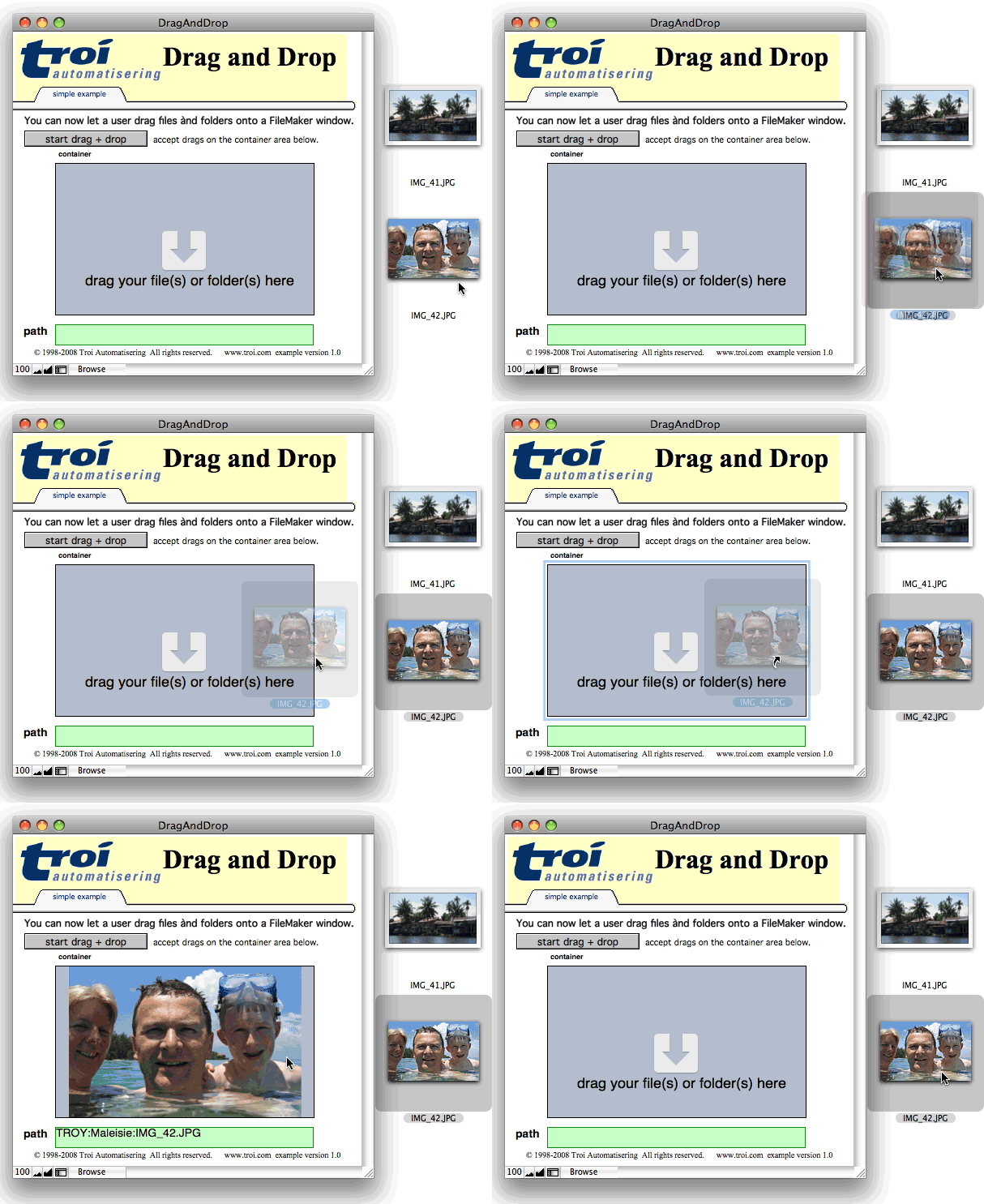
Troi File Plug-in allows you to drag one or more files or folders on a FileMaker window or even a drop zone. The paths of the dropped items can then be handled by a triggered script, for example to put them in a container field. You can specify up to six drag destination rectangles (even on the same window), and each drag can trigger a different script. The plug-in has a ‘Bring to Front’ script step that will bring FileMaker Pro back in front of other applications when you use the Drag and Drop functionality to drag from another application that is in front.
The drag and drop functionality includes Mail Drop (macOS only). You can drag one or more emails from the Mail.app to the FileMaker window. Add the switch “-AllowMailDrops” to the switches parameter of TrFile_DragAndDrop function to enable this extra functionality. The DragAndDrop example file reflects the Mail Drop functionality with an extensive example demonstrating the handling of single and multiple Mail Drops.
Drag “file promises” into FileMaker
On macOS you can drag “file promises” into your FileMaker database. These are files or images that don’t exist yet, which you can receive from a different application. When you add the switch “-AllowFilePromiseDrops” you can drop files or images for example from a web application (like Safari or Photos) to the drop zone. You can also drag custom types from a web application, like a zip file.
Drag files out of FileMaker
The function TrFile_StartDragSource allows you to click and drag the (binary) contents of a container field or variable as a file out of FileMaker into other applications (for example a web application). You add this function to a tooltip calculation to enable it on the layout.
With the TrFile_ExecuteShell function you can execute a command in the command shell of the operating system. On macOS this will be a command executed in the UNIX Bash shell, and on Windows this is the Windows CMD shell.
Troi File Plug-in can be used in a lot of ways. Its 90 functions and 40 script steps give you a universal tool that can be used in a lot of databases. Below are a few suggestions on how Troi File Plug-in can be useful:
The possibilities are only limited by your imagination!
You are free and invited to test the plug-in before you pay. Troi File Plug-in is fully functional in demo mode, it will only stop working after 2 hours of testing. Download your copy here.
Troi File Plug-in 18 adds compatibility with FileMaker Pro 26 ( Claris FileMaker 2026).
We added the TrFile_MoveToTrash function and Move To Trash script step. With these you can move a file or a folder to the trash bin (Recycle Bin on Windows). The items will be deleted when the user empties the trash.
Also the Drag and drop functionality is now compatible with FileMaker Pro 26.
For other new functionality and a complete list of fixed problems and other improvements please see the Version history below.
New functionality
Improved Drag and Drop functionality
Other bug fixes and changes
Improved compatibility
Enhanced Script Triggering functionality
Bug fixes
Improved compatibility
Support for files on custom mount points
New and improved functionality
Improved example files
Other bug fixes and changes
Improved compatibility
New FileID functionality and support
Date and time improvements
Extended disk information
Improved ICC color profile support
Improved Drag and Drop functionality
Startup Registration Log
Other bug fixes and changes
Improved compatibility
New functionality and improvements
Unicode improvements
This normalization is also implemented in these script steps:
Improved Drag and Drop functionality
Improved thumbnail and metadata support
Improved security and speed
Other bug fixes and changes
Improved compatibility
New functionality and improvements
and the functions:
If the source file has extended attributes they are also copied to the destination file. If the source file has a (legacy) resource fork stored as xattr this is also copied.
Improved Security
Increased speed
Improved Drag and Drop functionality
Improved (movie) metadata support
* Note that the -GetMovDescriptionStr switch is different from the existing -GetMovieDescription switch, which returns a list of (all) movie properties.
Startup Registration Log
Other bug fixes
For older release notes please see here.
We offer the following licenses for Troi File Plug-in:
single user, 10-user and 25-user license: these are meant for using the plug-in client-side on FileMaker Pro (Advanced), including with files hosted by FileMaker Server. You need a license for every user that makes calls to the plug-in’s functions.
developer license: this license is meant for FileMaker developers, who want to include the plug-in with their database(s) or custom app(s) and distribute it to their end-users. Each of your end-users may use the plug-in with up to 25 users (contact us if any of your customers has more than 25 users). The number of organizations you distribute the plug-in to and the number of databases or apps you distribute it with are not limited. Works on FileMaker Pro (Advanced), including with files hosted by FileMaker Server.
Go to the developer license page for more info.
server/web license: this license registers the plug-in for use on FileMaker Server. It does not provide any client-side functionality. You only need this license if you want to use the plug-in in server-side scripts and in web published databases. It has no user limit.
Go to the server-side plug-ins page for more info.
All licenses work both on macOS and on Windows.
| single user license | US $ 119 per user | |
| 10-user license | US $ 519 | |
| 25-user license | US $ 849 | |
| developer license | US $ 849 | |
| server/web license | US $ 519 |
Troi File Plug-in 18 requires a new version of the registration. If you have a license for a previous version, you can buy an upgrade for version 18. If you have a current subscription the upgrade is free. If you bought a license on or after July 8, 2025, the upgrade to version 18.0 is also free! Note: eligible users will be sent a new v.18 registration code. Contact us if you have not received yours after July 20, 2026.
If you bought a license before July 8, 2025, you will need to buy an upgrade to use the 18.0 version:
| single user license upgrade | US $ 79 per user | |
| 10-user license upgrade | US $ 299 | |
| 25-user license upgrade | US $ 449 | |
| developer license upgrade | US $ 449 | |
| server/web license upgrade | US $ 299 |
Below are a few things our users had to say about Troi File Plug-in:
“You know that you have a good product when someone (me) buys it just because of a single function.
In my case, it is TrFile_CreateThumbnail function.
That problem (creating thumbnails) alone has taken me days to try and figure out (MBS = nope, Claris = nope). It does exactly what I need and more. We have an in-house application and need accurate thumbnails on image and PDF files. NOBODY but you gets it right.
I especially like the PDF support, variable bit-depth, and PNG with Alpha channel support. And the simplicity of calling the function means I can easily use it in a calculated field. It is what Filemaker’s GetThumbnail should have been, except on steroids!
Thank you for solving my long running problem.”
John Taylor, CEO, Lead Free Design
“We have used the Troi Plug-In for years and it has worked flawlessly with our Filemaker Pro 11. I have had to reach out several times to purchase a new product or when I required a download for a new computer. I always receive a response within the hour and Troi is amazing in support. Thank you.”
Elaine Phares, Core Hospitality Advisors
“I bought Troi File Plug-in a week ago. Thus far, the plugin has worked absolutely flawlessly! I was using a free plug-in for (if exist) file checks and it occasionally returned incorrect results. Troi has been 100% since the first script run. Seriously, seriously good, clean software! Worth EVERY penny! I have yet to see any malloc/free issues and I’ve not needed a single reboot (whereas the free plug-in required more hands-on admin). The Troi plugin is simply miles and away superior.”
John Czlonka – CTO & Lead Software Architect, Marcon Pipelines, Inc., Calgary, Canada
“I have been using the file plugin for a long time (10 + years) and it has been great. Very easy to use and powerful. Awesome work :)”
Steven Durow, Director of Data Analysis Department, Fargo Public Schools, Fargo ND, USA
“Your customer service is first-class, there are many companies that could learn a lot from you about how to help and advise their clients. I really appreciate it.”
David Fox, WhatHat Ltd.
“I like to thank you for an excellent plugin that has made many of my solutions two steps better than I ever could do in pure FileMaker.”
Johan Hedman, certified FileMaker developer at PositionEtt AB, Sweden
“I really have to say, that Troi File Plug-in is a fantastic extension for Filemaker. Troi opens a wide range of possibilities to improve our database and helps us a lot, to make the photo-handling easier.”
Daniel Stöckli, Switzerland
“We have used a single version of the original Troi File classic plug-in for a several years, converting last week to a 10 user of the v4 version for Filemaker 8+.
I was amazed how quick and easy it was to convert our code, as we use the Troi File functionality in about 40 instances across about 15 scripts.
Troi File has been critical to our ability to extend Filemaker’s functionality to allow us to generate a dynamic website with hundreds of pages made up of complex HTML, XML, Javascript and PHP. It would have been impossible to achieve this result without Troi File, which has proved to be a reliable, consistent, and high performance Plug-in.
You can see the result at www.recruiting.co.nz
Thank you for developing and supporting Troi File so professionally, in the future I’m sure we will use more of your products.”
Paul Royse, www.recruiting.co.nz
“I think this is a fantastic product, it does what it says and I am overwhelmed by the functionality that is offered.”
Peter Cross, read his complete review of Troi File Plug-in on the FMPug website
“I just want to let you know how highly I think of your product, Troi File. I’ve been developing a commercial solution that makes extensive use of the plug-in. It’s easy to use and most importantly, it’s rock solid. I’ve emailed you support questions from time to time and they are always answered with the information to solve the problem.
I cannot praise your product enough.”
Randy Lawrence, Absolute Advantage, Inc.
“Two weeks ago I had a very intensive project; full automation of a data conversion routine involving import and export of thousands of files. The Troi File Plug-In (and your very helpful and timely advice) made it all happen and get delivered on time.
In the past years of doing FileMaker development the most visionary and extensive projects I have been involved in have used Troi Plug-Ins as an essential component. Troi Plug-Ins give the ability to automagically harness system level processes; the simplest way of describing it is a “Wow” factor on the client’s side and a fundamentally elegant, straightforward, and fast scripting process from the developer’s perspective. They put a powerhouse of programming behind FileMaker’s ease of use.
Although I have used them for a wide range of functions I still feel I’ve only scratched the surface of Troi Plug-Ins possible applications. Much thanks for providing an essential tool to FileMaker developers.”
Beatrice Beaubien, i2eye, Toronto, Canada
“Thought you might be interested to hear about something we’ve done using Troi File and Troi Coding.” Read how Noam Sturmwind of Oak Bay Softrends, Inc. manages to update the local files on his client’s workstations by automatically downloading a new copy of the files when the workstation connects to the server. “Not only does this save us a lot of time in re-installing on each workstation, it also means that we don’t have to worry about local files becoming corrupted.”
Noam Sturmwind, Oak Bay Softrends, Inc., Vancouver, BC, Canada Read the whole story
Troi File to the rescue!
Read how Troi File Plug-in helped Heather McCue of OshVay Associates to migrate thousands of databases for a client and improve another client’s PDF reporting solution:
“Thank you Troi, we could not have managed without you!”
Heather McCue, OshVay Associates, Raleigh, NC Read the whole story
“Troi File Plug-in is a truly great product. I just wish I had looked into it properly when it first came out. If I had known just how powerful this tool was I’d have bought it for all my clients years ago.
Many thanks for a great product”
Peter Makin, Makin Rochard Ltd., United Kingdom
“Don’t leave home without Troi File Plug-in.”
Doug Rowe, Robyte Consulting
“Thank you for your new plug-in!
I bought it in about 10 seconds after I saw it can do exactly what I have been trying to do with Applescript unsuccessfully.
Using Filemaker to organize my cruise reviews, I was looking for a convenient way to export the html to a file.
I had been using the legacy Keyquencer to copy and paste information into a text-editor, and then save the file. To update my html files, this would take about 2 hours!
Your timing could not have been better. Now I can do the same task in about 2 seconds. Well worth the price of the plug-in!
Thanks for all your great work”.
Greg “Pepe” Giese, www.cruisingreview.com
“This plugin has become somewhat integral to many of the solutions I’ve worked on here. It’s a lifesaver!”
Tony Pottrell, Human Engineering
“At the recent suggestion of Dana Perry, I took a look at the Troi File Plug-in in the context of testing for the existence of the Adobe Acrobat Reader program (before launching PDF files from FileMaker). My study of the plug-in confirmed for me the great power of this tool for a variety of other tasks, including the automation of upgrades. I developed a routine with FileMaker and the Troi File Plug-in that I thought might interest other users.” Read more about it here.
Vince Lackner, The Lackner Group, Inc.
“As you might be aware, Brushfire for the Mac originally was written using AppleScript as the glue to pull the components together. When we ported Brushfire to the PC, we decided to use the Troi File plug-in. With Brushfire 1.5 we are using the Troi File plug-in on both Mac and PC versions. Not only was development with the plug-in smoother and easier than the AppleScript development, but the resulting code is more solid and robust. Since the switch to the Troi File plug-in our customer support telephone calls have dropped over 20%. I only wish we had started the project this way! Thank you for providing such an excellent tool.”
Russell Kohn, Chaparral Software & Consulting Services, Inc.
“I can’t thank you enough for this plug in. It is incredible what I have been able to do with FileMaker now that I have found your plug in. It’s simple to understand and I don’t think I could use FileMaker without it. I use it to create thousands of web pages from my FileMaker database very easily.”
Ben Levitan, USA
“Hello, Troi folks!
First, thanks for a great plugin in TroiFile! I’ve been using it to help power a great web site, www.topekamls.com (not available from 4:00 to 4:30 AM CST (GMT-7)). There we are using TroiFile, in concert with some calc fields in FMP, to detect whether a given house listing in our “available properties” FMP database actually has a picture on the hard drive or not, by using the TroiFile GetSize command – if it has a size, it’s got a picture! Saved our bacon for sure, as the database we’re importing the housing data from doesn’t have any kind of field that would otherwise let me know if any given record has an associated picture or not. Many thanks!
We’re also using TroiFile to write lasso-enabled template-based web sites for us. It writes from an FMP database which stores the raw HTML, and then substitues in customer-specific data right before TroiFile writes that html to a file out on the web server. We’ve got it writing about 500, 3-page websites every week for us, at a rate of about 1 complete site in 0.13 seconds on a rather modest AMD K6-2 450. Talk about profitability (and more time for our web designers to do other things)!”
John Krische, Krische Database Systems, Topeka, KS, USA
“From the US side of the pond, I offer my sincere thanks for the work you put into the File Plug-In. I didn’t realize the limitations that are inherent to FMP5 (Win) until I built my solution and found I couldn’t include badly needed features. After being directed to your web site by a fellow developer I downloaded and tested the evaluation copy. Shortly thereafter I purchased the Developer License.
What a Blessing the plug-in has been. It is everything that is advertised and then some. Thanks for an excellent piece of software. If my FMP solution is half as helpful and successful as your File Plug-in, I will be elated.”
Gary Hopps, Carthage, NY, USA
“I am having much success with your “Troi File” Plug-In- Thank You for making such a GREAT Product! Keep up the good work- Your products are an asset to the Filemaker community!”
James L. (Jay) Knight, Jr., Lead Developer Infotraxx Systems, Inc.
“The Troi File Plug-in is a very powerful addition to a FileMaker user’s armoury.”
Richard Dyce, MacUser UK
“This plug-in rocks! Keep up the great work”
Enrique Pardo, edesign graphic studio, Geneva, Switzerland
“I tried Troi’s file plug in and the demo file sucked in a folder full of JPEGs from my Mavica 91. All the plug in needs is a little sound file that makes the sound heard when emptying the contents of a container via a straw….slurrrrrpppp…”
Jack Rodgers, FileMaker developer
“I grabbed this plug-in, took it for a spin and it is totally the tool that I’ve needed for many a moon. AND it has many many other features that have my wheels turning – Thank you for this piece of Magick!”
Fritz Jung, The Witches’ Voice www.witchvox.com
“Thanks for the brilliant software. The Troi File and Text plug-ins keep making my work much easier.”
Eric Smith McGill University Montreal, Quebec, Canada
“FANTASTIC! and Congratulations! I love the File Plug-in and can’t wait to try out these new and exciting features! Great work! Especially the new folder functions: DeleteFolder, SelectFolder!”
Eric S. Pecoraro, Proxiva Corporation
“I started developing with the demo, and it is a joy to be able to do the things you can do with the File plug-in.”
Johan Edenvik, Database and Web Developer of Administrator Finansservice AB, Sweden
“I’am very happy with your plugins they’re better than FileMaker itself !!”
dipl. Ing. HTL Longin Ziegler, www.ismile.ch
We are still collecting more comments. If you have any remarks on the File Plug-in please send us your comments. Thanks!
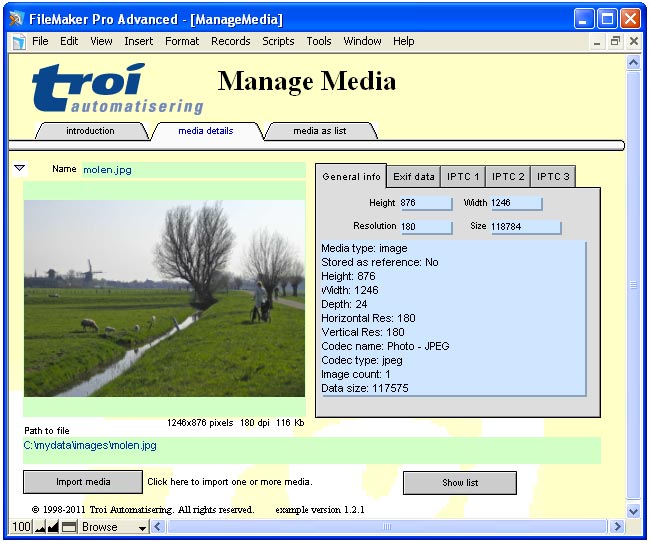
Click images to enlarge
File Plug-in online help
Function and script step reference.
File Plug-in FAQ
See a list of Frequently Asked Questions about this plug-in.
Using SMB styled paths with Troi File Plug-in
Learn how to use SMB styled paths as parameters for any file or folder path and how to add a port number too if the SMB server is available on a different port.
Troi File Plug-in compared to file functions in FileMaker 18
Read a more detailed comparison between native file manipulation functions in FileMaker 18 and Troi File Plug-in.
Media management
Some ideas how Troi File Plug-in can help you manage images, movies and other files.
Get icons into FileMaker Pro
How to easily add the icons of files on your disk to your FileMaker app.
Selecting files in FileMaker
How to let a user select a file on disk, for example to get the contents into FileMaker.
Files and folders and FileMaker
Easily see which files or folders are in a folder.
File Plug-in conversion from FileMaker Pro 6
(Older) information on how to convert databases which use Troi File from FileMaker Pro 6 to FileMaker Pro 7 and later.
Manipulate any information on your disk directly from within FileMaker!