

Troi Text Plug-in is a very powerful tool for dealing efficiently with text in your FileMaker Pro database. It adds spell checking, set creation, lines and word functions, XML parsing and more!

FileMaker Pro 19 to 26 (2026)
FileMaker Server 19 to 26 (2026)
macOS 12 to 26
Windows 10 to 11
With the plug-in installed you can do all this from within FileMaker:
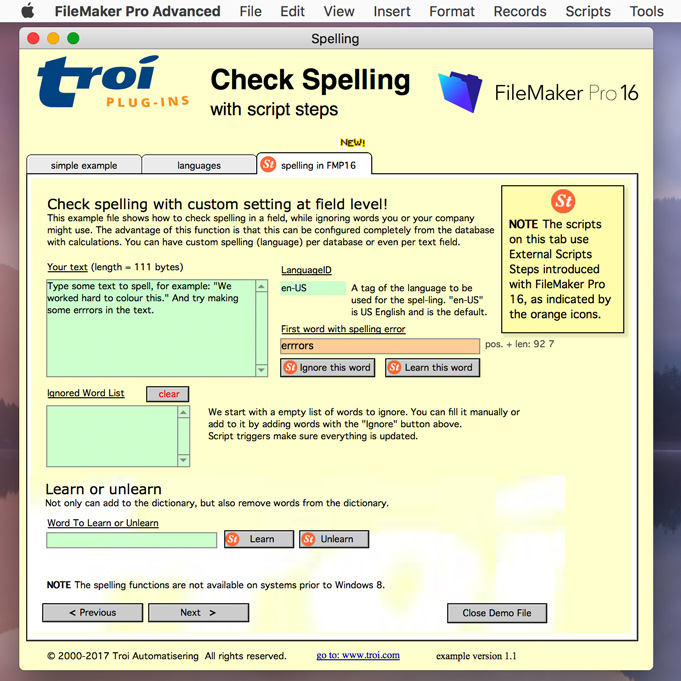
Troi Text Plug-in’s spell checker can be configured completely from the database with calculations. You can specify a custom spelling (language) per database or even per text field, all driven from a script or a calculation. You can also specify to ignore words you or your company might use.
With Troi Text Plug-in you can get the text contents of the clipboard into your database. You can also return fmxmlsnippets that are on the clipboard as text. A fmxmlsnippet is XML formatted data that is put on the clipboard when you copy scripts or other structure elements of a FileMaker database. You can get these types of fmxmlsnippets as text:
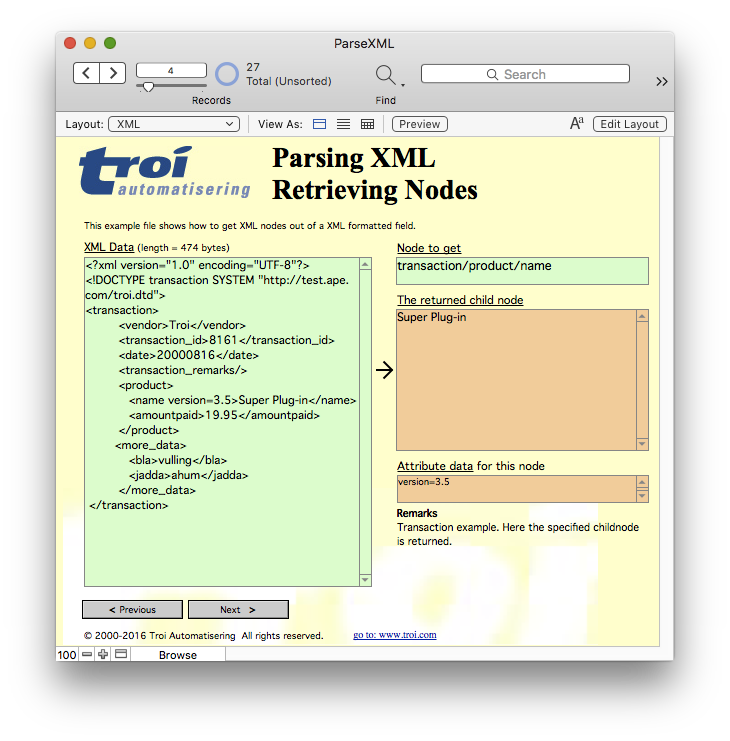
With Troi Text Plug-in you can get XML nodes out of XML formatted text and parse the info into separate fields in your database. You can get the contents of the nodes and child nodes and the attribute data of the nodes.
The ANDText, XORText and NOTText functions let you find all lines that are the same in two text fields, are lines that are different in two text fields and all lines that are in one but not in the other text field.
Troi Text Plug-in’s Lines and Word functions let you return:
The possibilities are only limited by your imagination!
You are free and invited to test the plug-in before you pay. Troi Text Plug-in is fully functional in demo mode, it will only stop working after 2 hours of testing. Download your copy here.
Version 7.0 is tested and made compatible with Claris FileMaker Pro 2026 (FileMaker Pro 26). We also improved compatibility with Claris FileMaker Pro 2025 (FileMaker Pro 22.0.6). The plug-in is also tested and made compatible with macOS 26 (Tahoe) and Windows 11, including Windows 11 version 25H2 (September 30, 2025).
In this version we improved the handling of large text, with length of over 100.000 characters. The TrText_GetClipboardAsText function can now return plain text from the clipboard in more cases. We also improved the example file GetClipboardAsText.fmp12 to better handle cases where there is no text on the clipboard.
See the Version history below for a complete list of changes in this and earlier versions.
Improvements and changes
Improved compatibility
New functionality and improvements
Bug fixes and changes
Startup Registration Log
Improved compatibility
New functionality and improvements
Improved security and speed enhancements
Unicode improvements
Startup Registration Log
Other bug fixes and changes
Other changes and improvements
Troi Text Plug-in 4.5.1 (for FileMaker 12 to 16) (May 19, 2019)
Version 4.5 (for FileMaker 12 to 16) (November 13, 2017)
Extra features when running FileMaker Pro 16
NOTE Only steps that perform an action have been added as a script step. Functions that have no side effect (like for example TrText_ANDText) are only available as an external function.
Bug fixes
Version 4.1 for FileMaker Pro 12, 13 14 and 15 (October 27, 2016)
Version 4.0.1 for FileMaker Pro 12, 13 14 and 15 (June 21, 2016)
Version 4.0 for FileMaker Pro 12, 13 and 14 (May 4th, 2016)
For older release notes please see here.
We offer the following licenses for Troi Text Plug-in:
single user, 10-user and 25-user license: these are meant for using the plug-in client-side, on FileMaker Pro and FileMaker Pro Advanced, including with files hosted by FileMaker Server. You need a license for every user that makes calls to the plug-in’s functions.
developer license: this license is meant for FileMaker solution developers, who want to include the plug-in with their solution(s) and distribute it to their end-users. Each of your end-users may use the plug-in with up to 25 users (contact us if any of your customers has more than 25 users). The number of organizations you distribute the plug-in to and the number of solutions you distribute it with are not limited. Works on FileMaker Pro and FileMaker Pro Advanced, including with files hosted by FileMaker Server.
Go to the developer license page for more info.
server/web license: this license registers the plug-in for use on FileMaker Server. It does not provide any client-side functionality. You only need this license if you want to use the plug-in in server-side scripts and in web published databases. Go to the server-side plug-ins page for more info.
This license has no user limit.
All licenses work both on macOS and on Windows.
| single user license | US $ 59 per user | |
| 10-user license | US $ 219 | |
| 25-user license | US $ 329 | |
| developer license | US $ 329 | |
| server/web license | US $ 269 |
You need to use a 7.0 version of the registration. If you have a license for a previous version, you can buy an upgrade for version 7. If you bought a license on or after June 3, 2025, the upgrade to version 7 is FREE! Note: eligible users have been sent a new 7.0 registration. Contact us if you have not received yours.
If you bought a license before June 3, 2025, you will need to buy an upgrade to use the 7.0 version:
| single user license upgrade | US $ 39 per user | |
| 10-user license upgrade | US $ 129 | |
| 25-user license upgrade | US $ 169 | |
| developer license upgrade | US $ 169 | |
| server/web license upgrade | US $ 149 |
Below are a few things our users had to say about Troi Text Plug-in:
“Troi Text Plug-in is one of the most useful plug-ins on the planet.”
Robert J. Cummings, www.dbmscan.com
“I was totally stumped. I had to create a survey report listing totals of items checked in a Value List field. The field also had the “Other…” box checked so our value list could change at any time. I knew I could create a looping script to get a list of all the values in each field then go back thru and do a count for each value then put this data in a report blah blah blah… Which equals slowwwwwwwww.
I just knew there had to be a better way. I was using the Troi Text Plug-in to build my list in the above scenario, so I knew I was on to something. Then I took a look at the Book Index example provided with this gem of a plug-in. Awesome!!!
Using this template I was able to create my reports. The reports took seconds to calculate. If I didn’t have to deal with the “Other…” option my reports would only need to be built once and would be dynamic.
Thanks for your excellent examples.”
Jeff Yurka, Real Mac Solutions
“You know what… we can’t make the Cambodia National Yellow Pages without your plug-in… it works wonder for us.”
Kim Gjemmestad, Cambodia National Yellow Pages
“I just went through the once-tedious chore of getting related data processed for a client of mine. This chore is now an amazingly simple task! The solution? Troi Text Plug-in. It’s a Godsend. This plug-in allows you to create JUST ONE calculation field that automatically concatenates all the text from multiple fields in a portal! Ta-da! Thank you Peter Baanen! :)”
Scott Rose, President ScottWorld, FileMaker Pro Experts Since 1992 http://www.scottworld.com
“Thanks for the brilliant software. The Troi File and Text plug-ins keep making my work much easier.”
Eric Smith, McGill University Montreal, Quebec, Canada
“All Hail Troi-Text Plug-in (and FAXTool)!
I just wanted to relate to you our latest application of the Troi-Text plug-in. I’m using this butt-saving tool on a daily basis!.
We recently built a press-release distribution system for a Massachusetts organization to send FAXes and eMails to more than 300 newspapers in the state, regarding recycling programs in 351 towns. Since each newspaper’s readership area covers anywhere from 1 to all 351 towns, we built a relational system to manage this quite easily.
Each newspaper receives either an eMail or FAX, with a personalized cover letter/text, and a columnar table of data about recycling for all the towns only in their readership area.
Not a minor complication, we wanted to send only one eMail or FAX to each unique eMail or FAX destination, even though some newspapers share the same FAX or eMail address. We used the Troi-Text plug-in first to list all the newspapers in the ‘To’ line of the letter.
We built parallel functionality, all facilitated with the Troi-Text plug-in. FAXing (using FAXTool) was not difficult, since we simply FAXed a report layout of the related town data records for all towns associated with each of the newspapers included in a single letter.
We wanted to send a text-only press release (no attachments) that approximated the printed FAX, and were successful in converting the columnar report into monospaced text format using the Troi-Text plug-in.
We used various calculations to produce a monospaced, fixed column width text string for each line of the columnar report. Then we used the Troi-Text plug-in to gather and sort all the related file lines into one huge text field, along with the text of the letter, and sent that to our eMail client from FileMaker Pro.
Remember, since each newspaper can cover several towns, and some newspapers share an eMail address, we wanted to include those overlapping (duplicate) towns only once. We can do this on a printed/FAXed report using a summary part, and were able to reproduce the effect using the unique lines function of the Troi-Text plug-in.
It’s proven to be quite reliable, and doesn’t ‘choke’ on the fairly large number of records and huge text block that gets generated for some destinations!
I have, however, found the extremes of its capabilities. At one time I attempted to use the plug-in to create multi-key relationships which in turn were used to facilitate another dependent troi-text calculated result. Here, the plug-in choked and misbehaved, so that approach wasn’t feasible.
Once again, “Good work” and thanks.
Sincerely, Erik.”
Erik Wegweiser / Intelligent Database ( http://www.ichizen.com ), FileMaker Pro Developer, Consultant – Member, FileMaker Solutions Alliance
We are still collecting more comments. If you have any remarks on the Text Plug-in please send us your comments. Thanks!
Click images to enlarge
Text Plug-in online help
Function and script step reference.
Can you parse out XML data in FileMaker Pro in one step?
Yes, you can. Read here how.
Text Plug-in Conversion from FileMaker Pro 6
(Older) information on how to convert databases which use Troi Text from FileMaker Pro 6 to FileMaker Pro 7 and later.
Deal efficiently with text in your FileMaker Pro database!